Focused ReadingLAB

Step one

Find something worth getting stuck on.

Search live reporting from the Guardian, then pull an article onto a clean page where you can mark every place it makes you pause.

Searches go to the Guardian Open Platform. Your highlights and notes stay in this browser.

Sources to explore

Searching…

Article text and metadata: the Guardian Open Platform. Content © Guardian News & Media Limited. Every card links back to the original. Attribution and AI disclosure →

100%

Choose a source to begin

Open a reading from the Discover tab.

0 highlights Goal: 4+

Select any phrase that makes you pause. A highlighter tray appears. Your marks stay on the page and in the margin, and you can write or speak a note for each one.

Open a source from the Discover tab to load a reading.
Step three

Turn a reaction into an investigation.

Pick one of your marked moments. Instead of asking an AI for the answer, use the friction to decide what kind of source would help, then run that search for real.

1 Choose a moment

2 Choose a move

3 Your search

Choose a moment to build a search.

Step four

See the shape of your reading.

Your trail is not a quiz result. It is a map of where the text asked you to slow down, trust, doubt, connect, or investigate.

Highlights0Goal: 4+
Kinds used0of 7 possible
Sources read0Opened in the reader
Notes written0On your own marks

Synthesis matrix

Every source you have read, crossed with every kind of friction. Darker cells mean you marked more of that kind in that source. Click a cell to read those passages.

What caught your attention?

Your path

Every mark you made 0

Your process

A record of how this work was made, kept on your own device. It travels with your export so your instructor can see the process, not only the product.

Final reflection

What changed while you read?

Use the matrix and the map as evidence. The strongest reflection names a friction moment and explains what you did with it.

Clears the highlights and notes stored in this browser. Export first if you need a copy.

Guide

How to run this, and what to hand in.

A worked example for students, a teaching guide with assignments and rubrics for instructors, and the full disclosure of how the tool was built and what it does with your data.

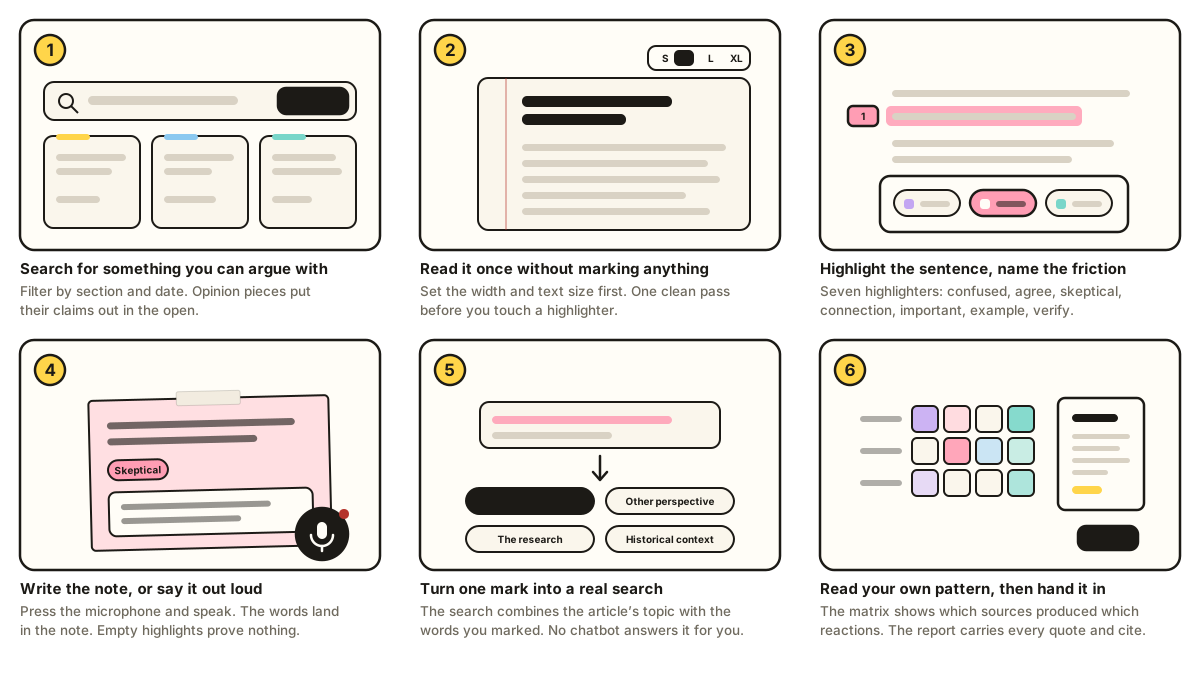
The whole activity in six moves

This is one student's path through a single article. Yours will look different. The shape is the same.

Six-panel storyboard: search for a source, open it on the reading page, highlight a passage and pick a highlighter, write or speak a note, run a search built from the passage, then read the matrix and export the report.

A worked example

  1. 1. Pick a source you can argue with

    Searched artificial intelligence AND students, filtered to Education, and opened a letter arguing that AI can reinforce learning. Opinion pieces make good first readings because the claims are out in the open.

  2. 2. Read once without marking

    One pass, no highlighter. Set the column width and text size first so nothing fights you.

  3. 3. Mark on the second pass

    Highlighted AI can also reinforce learning as Verify, because it is stated as fact with an anecdote attached.

  4. 4. Say why, out loud or in writing

    Pressed the microphone on the note and said: “The example is one student. I want to know whether anyone measured this on a whole class.” The transcript landed in the note.

  5. 5. Follow one mark into a search

    Chose Verify the claim. The search combined the article's topic tag with words from the passage and returned the study coverage the letter was responding to.

  6. 6. Read your own pattern

    The matrix showed four Verify marks and no Connection marks across two sources. That imbalance became the reflection: doubting everything, connecting nothing.

What good work looks like

Thin

Confused

“I don't get this part.”

Names a feeling. Gives the reader nothing to act on.

Strong

Confused

“I don't know what ‘reinforce learning’ means here. Remembering it later? Using it in a new problem? The letter treats those as the same thing.”

Names the specific word, offers two readings, and points at what would settle it.

Four habits that make the difference

  • Mark sentences, not paragraphs. A highlight that covers half a screen has not located anything.
  • Use more than two highlighters. If everything is Skeptical, you are performing doubt rather than reading.
  • Write the note while the reaction is fresh. Empty highlights are impossible to reconstruct later.
  • Investigate at least one mark. The point of noticing is what you do next.

Before you hand it in

  • Four or more highlights, spread across at least three kinds of friction.
  • A written or spoken note on every highlight. No empty marks.
  • At least one investigation run, with the source you found named in your reflection.
  • All three final reflection questions answered in full sentences.
  • Citation style set to whatever your instructor asked for, before you export.
  • Report exported and submitted. Check that your name is in it.

What this is for

Reading is invisible, so students who are struggling and students who are skimming produce the same silence. This tool makes the reading process leave a trace: where a reader slowed down, what kind of trouble it was, and what they did about it. The friction is the evidence. Grade that, not the count.

One design decision worth naming in class: there is no summarizer and no chatbot here on purpose. A tool that resolved confusion on demand would erase the thing students are being asked to notice. That absence is itself a teachable point about when AI helps and when it removes the work.

Three ways to run it

50-minute class

Live reading lab

Everyone opens the same article. Ten minutes reading without marking. Fifteen marking. Ten in pairs comparing where their marks landed. The rest on one investigation each. Homework: the reflection and the export.

One week

Source triangle

Students read three articles on one issue: news reporting, opinion, and something from the archive. Each source needs at least three marks. The matrix becomes the argument: which source produced doubt, which produced connection, and why.

Across a term

Reading log

One article a week, exported and submitted each time. The final assignment is a comparison of the first and last exports. What changed in how they read, not in what they read.

Assignment prompts to paste into your LMS

Assignment 1 · Noticing

Open Focused Reading Lab and search for an article on a topic from this unit. Read it once without marking anything. Read it again and highlight at least five passages, using at least three different kinds of friction. Write a note on every highlight explaining what the passage did to you, not what it said. Export the report and submit it.

Assignment 2 · Following the friction

Choose one passage you marked Skeptical or Verify. Use the Investigate tab to run a search built from that passage. Read one source it returns. In 300 words: state the original claim, describe what the new source added or complicated, and say whether you still doubt the claim. Submit both exports.

Assignment 3 · Reading your own pattern

Read three sources on one issue. Open the synthesis matrix on the Synthesize tab. Write 500 words on the pattern it shows: which kind of friction dominates your reading, which sources produced which reactions, and what a reader who marked the opposite pattern would have noticed that you missed.

Assignment 4 · Talk it through

Use the screen walkthrough on the Synthesize tab. Record three to five minutes of your screen while you talk through your reading trail: what you marked, why, and what you would read next. Submit the video file and the exported report together.

A rubric that grades thinking, not tallies

DimensionDevelopingProficientStrong
Placement of marks Highlights cover whole paragraphs or land on topic sentences only. Marks sit on specific claims, phrases, or evidence. Marks locate the exact words a claim depends on, including quiet ones.
Quality of notes Restates the passage or names a feeling. Explains the reaction and what caused it. Names what would change the reader's mind, and why.
Range One or two kinds of friction across the reading. Three or more kinds, used accurately. Range plus an account of the pattern itself.
Investigation No search run, or results unread. One search run and one source read. New source changes or sharpens the original question.
Reflection General statements about the topic. Cites specific marks as evidence of a change in thinking. Traces a line from a first reaction to a revised position.

A four-mark floor is a starting point, not a target. Twenty shallow highlights are worse than four examined ones, and the rubric should say so out loud before students start.

Reading the process log

Every export carries a record of how the writing happened: minutes of active typing per note, keystroke counts, pasted text with its size, and which notes were dictated. It exists because process is teachable and product alone is not.

What it can show you

  • A note that took eleven minutes of active typing and one that appeared in a single paste.
  • Whether a student read for twenty minutes before marking anything, or marked five passages in ninety seconds.
  • Which notes were spoken rather than typed.
  • Whether the reflection was written across three sittings or one.

What it cannot show you

  • It is not AI detection, and it cannot become AI detection. A pasted note may have come from a chatbot, from the student's own notebook, from a shared doc, or from a screen reader workflow. The log records the paste. It does not know the source.
  • A student who retypes generated text by hand produces a clean log. Anyone determined to defeat it can.
  • Students using dictation, translation tools, or assistive technology will look unusual and are not doing anything wrong.
  • The data lives in the student's browser and travels in a file they can edit. Treat it as a conversation opener, never as evidence.

How to use it well: tell students it exists before the first assignment, and show them the card they see on the Synthesize tab. If a log looks strange, ask the student to talk you through their reading. That conversation teaches something either way. A log used as an accusation teaches only that the tool is a trap.

Running it in a computer lab

  • Everything is local. Work is stored in the browser, per device and per browser profile. Students who switch machines start empty, so build the export into the deadline.
  • Shared computers: have students press “Reset this workspace” before they leave, after they export.
  • Voice notes need microphone permission and a browser that supports speech recognition. Chrome and Edge do. Firefox does not. See the disclosure tab for where that audio goes.
  • Screen recording works in Chrome, Edge, and Firefox on desktop. It is not available on iPad or iPhone, so make that assignment optional or pair students up.
  • Citations: the export can carry MLA 9 or APA 7 entries for every source and every quoted passage. Set the style on the Synthesize tab before exporting.
  • Rate limits: the Guardian developer key allows roughly 500 searches a day. A class of 25 doing a dozen searches each will sit close to that. For a large section, request a second key or proxy it.

Questions that work in discussion

  • Whose marks landed in the same place? Whose landed somewhere nobody else noticed?
  • Did anyone mark the same sentence with a different highlighter? What does the disagreement tell you about the sentence?
  • What would you have to believe for this article's central claim to be false?
  • Which of your marks would survive if the article were reported by someone else?
  • What did the search return that the article never mentioned?

AI disclosure

Where AI was and was not used

  • Building this tool: the interface and code were written with AI assistance (Anthropic's Claude, via Claude Code), directed, edited, tested, and approved by Marc Watkins. The framework, prompts, and friction categories are his.
  • Reading and marking: no generative AI is involved. Article text comes straight from the Guardian's API. There is no summarizer, no chatbot, no autocomplete, and no AI scoring of your highlights or notes.
  • Voice notes use speech recognition, not generative AI. It transcribes what you say. It does not write, rephrase, or improve it. In most browsers the audio is sent to the browser vendor's servers to be transcribed. Details are in the privacy card.
  • Your writing is never sent for training, analytics, or evaluation.
  • Why this matters: the activity is about the friction. A tool that resolved your confusion for you would remove the thing you are supposed to notice.

Privacy

What leaves your browser

  • Search terms go to the Guardian's API so it can return results.
  • Voice note audio: when you use the microphone, the browser's speech recognition service handles the audio. In Chrome and Edge that means Google's servers. In Safari, Apple's. Nothing is stored by this app except the text that comes back. If that is a problem for your class, type the notes instead. The feature is off until you press the button.
  • Screen recordings are captured and encoded in your browser. The video file is never uploaded. It downloads to your computer when you stop.
  • The process log (typing time, keystroke counts, pastes, spoken notes) is recorded on your device and shown to you on the Synthesize tab. It leaves only inside the report you export and hand in. It records that text was pasted, never where it came from, and it is not AI detection.
  • Everything else stays put: highlights, friction labels, notes, transcripts, your name, and your reading trail live in this browser's local storage on this device.
  • Sharing happens only when you export a report and hand it in.
  • Clearing: “Reset this workspace” on the Synthesize tab erases the stored data.

Attribution

Credit where it is owed

  • Concept and framework: extends the Reading Friction Tracker by Marc Watkins, University of Mississippi, licensed CC BY 4.0.
  • Article content: supplied by the Guardian Open Platform. Content © Guardian News & Media Limited, shown for personal educational reading, with a link back to the original on every card and page.
  • This build: Focused Reading Lab, 2026. Interface, icons, illustrations, and code are original to this project and released CC BY 4.0. Guardian content is excluded from that license.
  • Citing a passage: use the byline, headline, publication date, and URL shown on every reading and in your exported report.

Technical notes

For whoever maintains this

  • No build step. Three files and two SVGs. Open index.html or serve the folder.
  • API key lives in app.js and is visible in the page source, as in any browser-only app. Rotate it from the Guardian dashboard if it is abused, or put it behind a serverless proxy and repoint GUARDIAN.base.
  • Storage keeps only sources the student touched, and drops cached article text before it drops student writing if the quota fills.
  • Speech recognition uses the Web Speech API, which Firefox does not implement. The microphone buttons hide themselves when the browser cannot do it.

Focused Reading Lab · built on the Reading Friction Tracker by Marc Watkins, University of Mississippi · powered by the Guardian Open Platform